Project Tracker & Status Dashboard
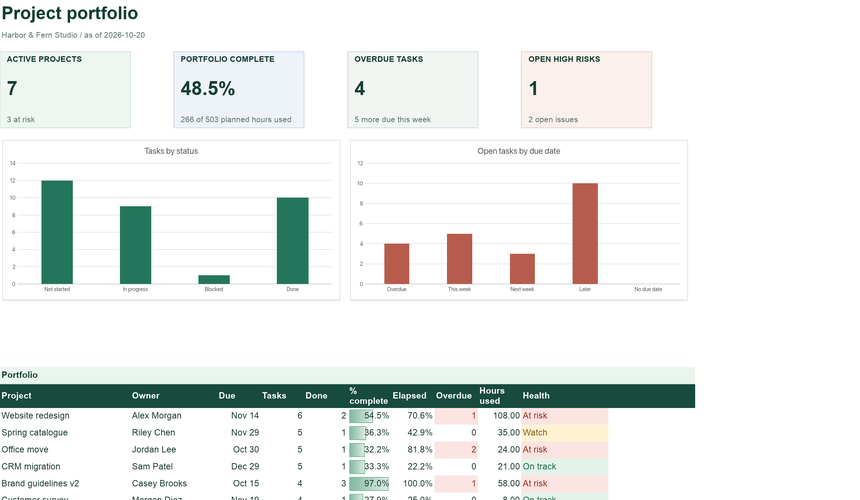
Projects, tasks, risks and a portfolio dashboard with automatic health status.
See what is inside ExcelCraft
EXCELCRAFT PRO TEMPLATE
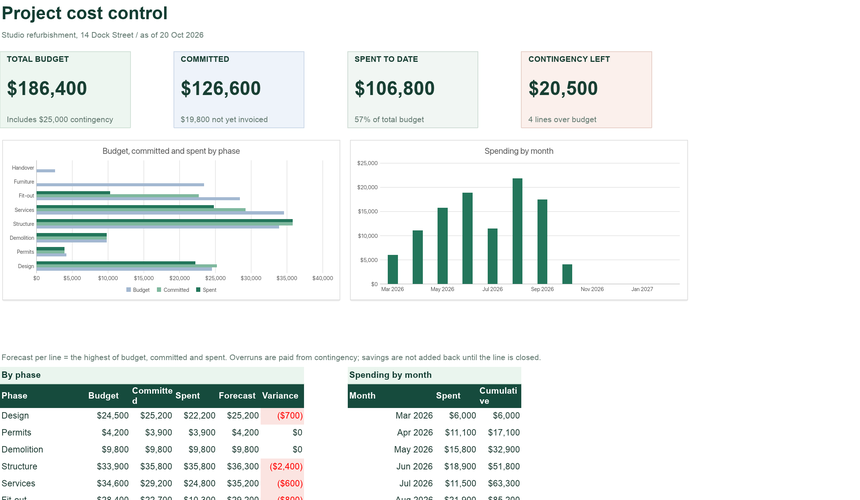
Catch overruns when the contract is signed, not when the invoice arrives. Budget each cost code, record commitments as you place orders, record costs as they are invoiced, and watch contingency.
Planned pricing: $8 a month or $60 a year. No payment is taken today.
INSIDE THE WORKBOOK
Mint cells are where you type. White cells calculate. Instructions inside the file explain each field.
WHY IT HELPS
Budget, committed and actual cost by cost code and phase, with forecast and contingency.
A signed contract above budget shows as over budget immediately, months before the final invoice.
Each line is forecast at the highest of budget, committed and spent, so overruns count straight away and savings wait until the line closes.
Contingency left = your contingency minus every overrun. When it gets close to zero, it is time for a conversation.
GETTING STARTED
The sample shows a working example; the blank version keeps every formula ready for your records.
List phases on Settings and give each cost code a phase, type and budget on Budget.
When you sign a contract or raise a purchase order, add it to Commitments against the code.
Add invoices to Costs. Review the Dashboard and the Budget status column each week.
QUESTIONS
Short answers about how the workbook behaves.
Money you have agreed to spend but may not have been invoiced for yet: a signed contract or a purchase order.
Because its commitments already exceed the budget. That is the point: it warns you early.
Yes, or for any project with suppliers: events, fit-outs, IT rollouts. Rename phases and cost types to suit.
No. Enter amounts consistently (all net or all gross) and handle retention in your accounting system.
Use Download XLSX or PDF in the editor before closing the tab. Nothing is saved to a server automatically, and your workbook never leaves your device while you edit.
The files use standard XLSX formulas without macros, pivot tables or external links. They are checked with the ExcelCraft engine; compatibility with every Excel or Google Sheets version is not guaranteed. Review formulas, charts and formatting in your app before relying on important figures.
Amounts use a $ number format. Change the cell format to your currency; the formulas do not convert between currencies.
EXCELCRAFT PRO · EARLY ACCESS
Pro workbooks cover whole workflows: purchasing to receiving, journal to balance sheet, tasks to portfolio health. Pro is planned to include AI credits for editing through chat. Pro downloads and the AI assistant are not available yet.
$8/ month
or $60 / year · planned launch price
No payment today. We email you once when Pro opens.
How Pro worksRELATED
Separate workbooks for neighbouring jobs. Records do not sync between files.
Projects, tasks, risks and a portfolio dashboard with automatic health status.
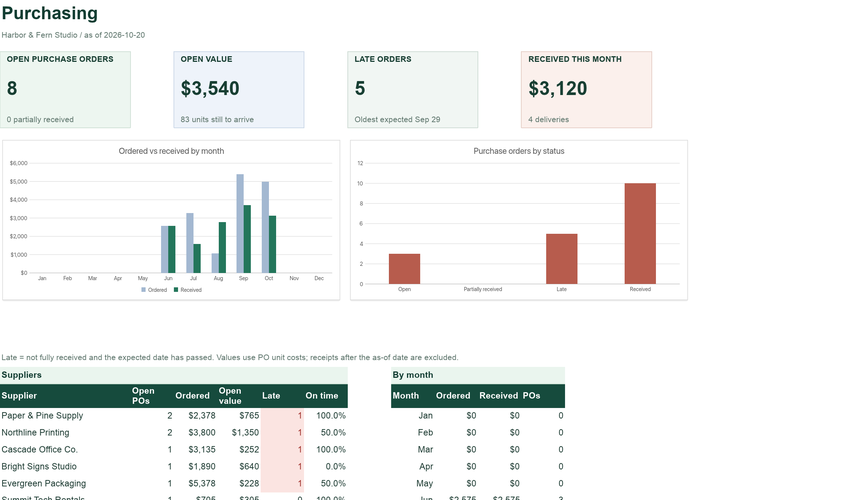
See what is insidePOs, line items and deliveries, with late orders and supplier on-time rates.
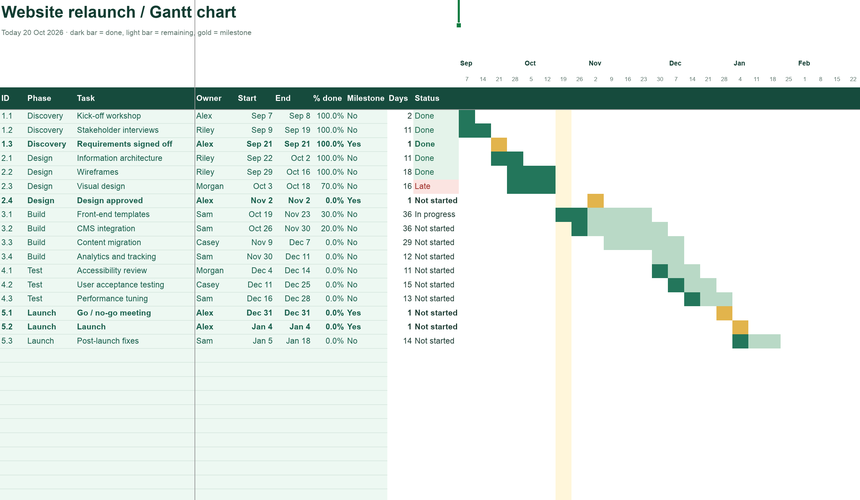
See what is insideWeekly timeline bars with progress shading, milestones, late flags and phase progress.
See what is insideYour workbook stays in this browser while you edit. Use Download in the editor to keep your work, and review important figures in the saved copy. How local files are handled.
Original ExcelCraft workbook design, formulas and fictional sample data · CC0. Management tool only; not tax, legal or accounting advice.