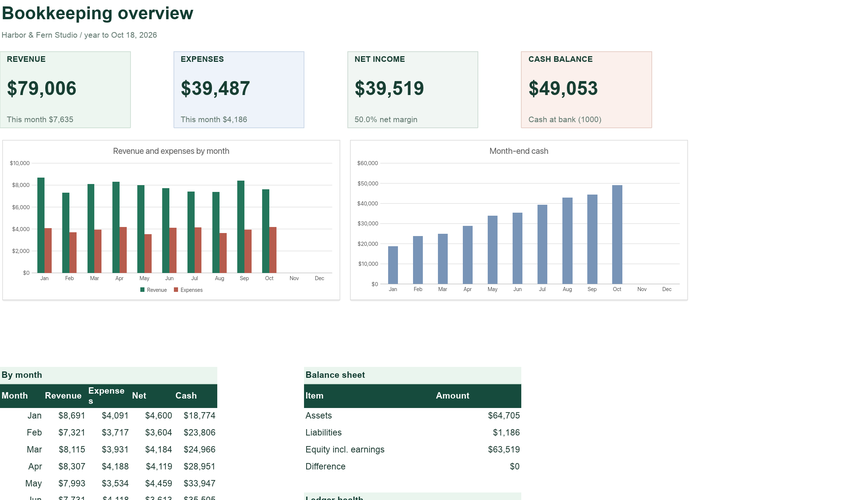
Bookkeeping & General Ledger
Double-entry journal, trial balance, income statement and balance sheet.
See what is inside ExcelCraft
EXCELCRAFT PRO TEMPLATE
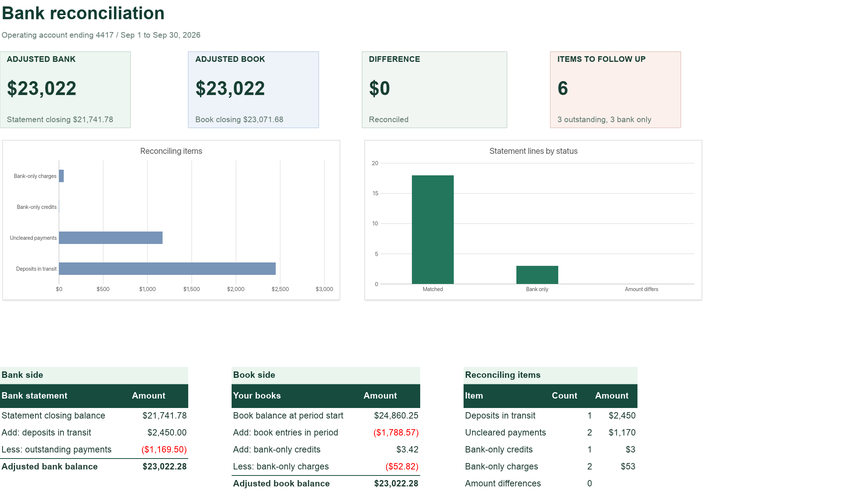
Close the month knowing your cash is right. Match the bank statement to your books with a simple ID, and the reconciliation builds itself: deposits in transit, outstanding payments, bank-only items and a difference that should be zero.
Planned pricing: $8 a month or $60 a year. No payment is taken today.
INSIDE THE WORKBOOK
Mint cells are where you type. White cells calculate. Instructions inside the file explain each field.
WHY IT HELPS
Match statement lines to your books and prove the difference is zero.
Give a statement line and its book entry the same match ID, such as the cheque number. Mismatched amounts are flagged immediately.
Statement balance plus deposits in transit, less outstanding payments, equals the adjusted bank balance. Books plus bank-only items equals the adjusted book balance.
Opening balance plus every line must equal the printed closing balance, so a missing or mistyped line shows up before you start matching.
GETTING STARTED
The sample shows a working example; the blank version keeps every formula ready for your records.
On Settings, add the period and the opening and closing balances from the statement, and your book balance at the start.
Put statement lines on Bank Statement and your cash entries on Book Entries, money in positive and money out negative.
Add match IDs until only genuine reconciling items remain. The difference should read $0.00.
QUESTIONS
Short answers about how the workbook behaves.
Lines on the statement that are not in your books yet, such as bank fees, interest or an unrecognised deposit. Record them in your books next.
Copy outstanding book entries (deposits in transit and uncleared payments) into next month's Book Entries. They clear when they appear on the statement.
Yes. Paste the date, description and amount columns. Make sure money out is negative.
No. Nothing is uploaded. You paste the statement lines yourself.
Use Download XLSX or PDF in the editor before closing the tab. Nothing is saved to a server automatically, and your workbook never leaves your device while you edit.
The files use standard XLSX formulas without macros, pivot tables or external links. They are checked with the ExcelCraft engine; compatibility with every Excel or Google Sheets version is not guaranteed. Review formulas, charts and formatting in your app before relying on important figures.
Amounts use a $ number format. Change the cell format to your currency; the formulas do not convert between currencies.
EXCELCRAFT PRO · EARLY ACCESS
Pro workbooks cover whole workflows: purchasing to receiving, journal to balance sheet, tasks to portfolio health. Pro is planned to include AI credits for editing through chat. Pro downloads and the AI assistant are not available yet.
$8/ month
or $60 / year · planned launch price
No payment today. We email you once when Pro opens.
How Pro worksRELATED
Separate workbooks for neighbouring jobs. Records do not sync between files.
Double-entry journal, trial balance, income statement and balance sheet.
See what is insideYour workbook stays in this browser while you edit. Use Download in the editor to keep your work, and review important figures in the saved copy. How local files are handled.
Original ExcelCraft workbook design, formulas and fictional sample data · CC0. Management tool only; not tax, legal or accounting advice.