
SPREADSHEET GUIDES
Open Source Excel Alternative: Meet ExcelCraft
A familiar spreadsheet workspace in your browser, powered by an open-source engine. Here is where it fits—and what to check before switching.
If you are looking for an open source Excel alternative, start with the job you need to finish. Opening an emailed workbook, updating a few figures, and downloading a copy is a different requirement from replacing a desktop workflow built around macros and complex models.
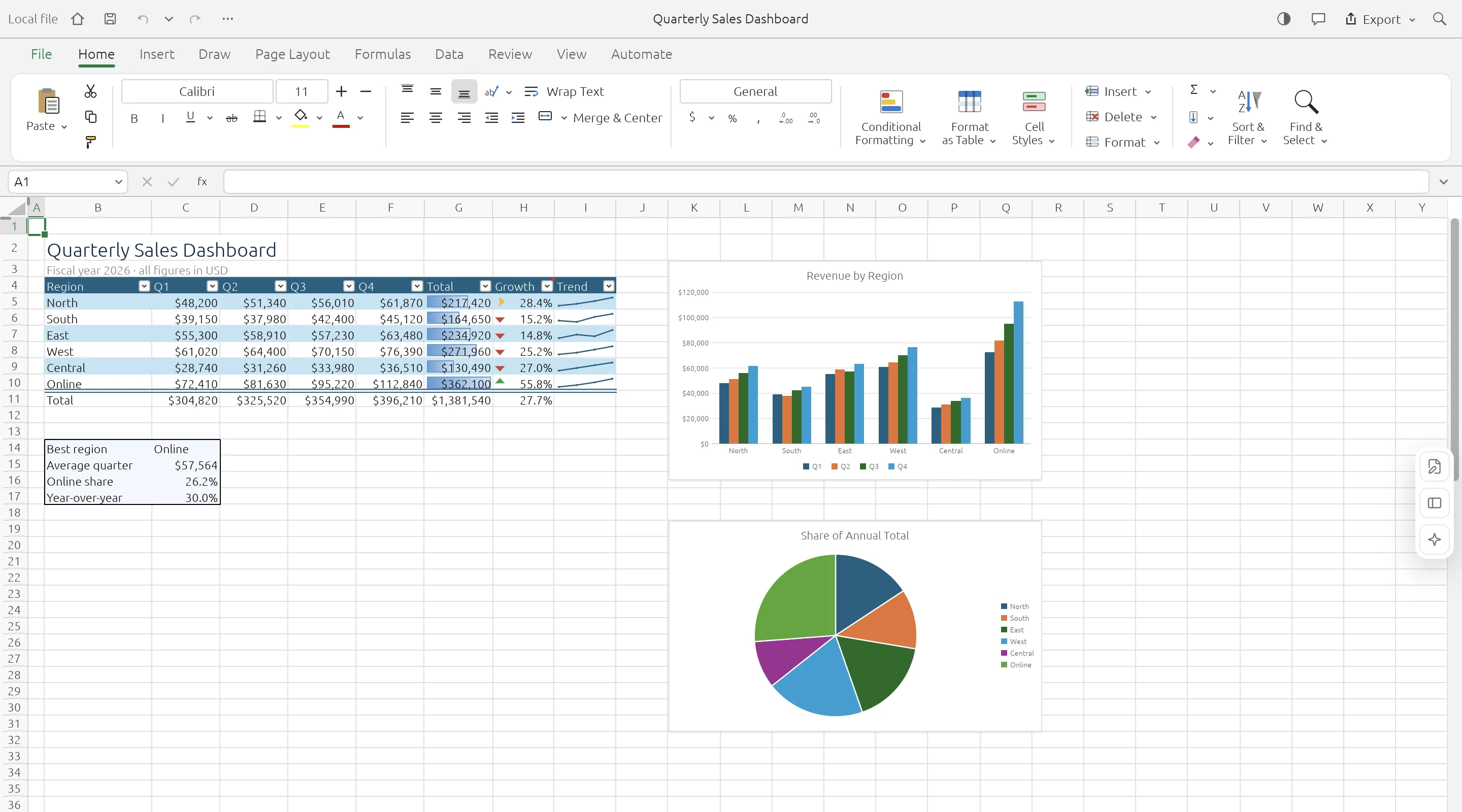
ExcelCraft is built for that first kind of task: a free browser spreadsheet where you can open a local file, edit it, and download your work. Its spreadsheet engine is GridCraft, an open-source project written in Rust. ExcelCraft brings that engine into an independently branded web workspace.
What does “open source” mean here?
Free access and open-source licensing are separate things. A tool can cost nothing to use without making its source code available. For an open-source option, you should be able to find the code and its license.
ExcelCraft uses the open-source GridCraft engine, which is available under MIT or Apache-2.0. This distribution uses the MIT license and retains the upstream notices. You can inspect the GridCraft source repository and read the licenses and attribution shipped with ExcelCraft.
That describes the engine’s licensing. It does not mean the entire ExcelCraft hosted service is published as an open-source, self-hostable package. If your priority is auditing or building a spreadsheet engine, start with the upstream repository. If your priority is working on a file in a browser, start with ExcelCraft.
What you can do with ExcelCraft
The workspace includes a spreadsheet grid, a formula bar, worksheet tabs, formatting controls, charts, and undo/redo. Basic opening, editing, and downloading do not require an account. Optional sign-in is for preferences; it does not turn the editor into cloud workbook storage.
- Open an XLSX workbook. Use the XLSX viewer to inspect sheets and cell values. It opens the editable workspace, so it is not a locked read-only viewer.
- Edit a CSV file. The CSV editor gives tabular data a spreadsheet interface. CSV output cannot preserve multiple sheets, formatting, or formulas.
- Make everyday changes. Update a quantity, correct a label, or adjust a formula, then check the result before exporting.
- Download a separate XLSX copy. Keep the original file and save your edited version with a clear filename.
- Start with a template. Browse the template library and choose a free workbook for a budget, invoice, or tracking task. Pro previews are separate from the available free templates.
Your workbook stays on your device
ExcelCraft processes workbook data locally in your browser instead of uploading the workbook to a server. Files chosen on a tool page are temporarily handed to the editor through local browser storage; opening a file directly in the editor uses browser memory.
Local processing is useful when you want to inspect a file without first putting it into a cloud drive. It also means you are responsible for saving the result: there is no automatic cloud workbook backup or recovery. Download your changes before closing the workspace. The privacy policy explains website analytics, account data, and other details separately from workbook processing.
Where it fits among Excel alternatives
There is no single replacement that suits every spreadsheet workflow. Choose based on where you work, what your files contain, and whether you need a hosted tool or source code.
| Your main need | A useful starting point | What to check |
|---|---|---|
| Quick browser edits to a local file | ExcelCraft | Open a representative workbook and verify the downloaded copy. |
| An installed open-source office suite | LibreOffice Calc | Test the spreadsheet features and file formats your workflow needs. |
| Spreadsheet engine source code | GridCraft | Read its license, build instructions, and development status. |
| A workflow dependent on Excel-specific automation | Your existing Excel setup | Identify dependencies before attempting a migration. |
LibreOffice includes Calc as its spreadsheet application and is an open-source office suite. ExcelCraft offers a different entry point: a hosted browser workspace for local files. You can use different tools for different tasks without moving every workbook at once.
Compatibility limits to understand first
The GridCraft engine shipped with ExcelCraft is in alpha. Familiar controls do not guarantee identical Excel behavior. Important formulas, charts, layout, and exported results deserve a check against the original workbook.
- VBA macros do not run. Do not use ExcelCraft as a replacement for a macro-dependent workflow.
- ODS and XLSB imports use saved values. Do not assume formulas and styling will transfer intact.
- Legacy XLS is an import path. ExcelCraft offers XLSX downloads, not legacy XLS output.
- Complex files can be demanding. The website’s file entry controls have a 20 MB limit, but being under that limit does not guarantee a workbook will open successfully.
- Cloud collaboration is not available. There is no shared live workbook or automatic cloud save.
The AI assistant is also not available yet. Its early-access entry should not be mistaken for a working AI spreadsheet feature.
Try a small workbook in five steps
- Open the sample workbook to explore the interface without selecting a personal file.
- Choose a copy of a simple XLSX or CSV file from your device.
- Check sheet names, dates, totals, and any formulas you rely on.
- Make a small change and download an XLSX copy.
- Reopen the download in the application you normally use and compare the important results.
For example, if you update an invoice tracker, verify the amount and status you changed as well as any affected totals. That small round-trip check tells you more about suitability than a long feature list.
Frequently asked questions
Is ExcelCraft free to use?
Basic file opening, editing, and downloading are free. The site also lists planned Pro features and previews; these are not required for the basic editor.
Can I use it without uploading my spreadsheet?
Yes. Workbook processing happens on your device in the browser. You still load the website and its assets over the network; local workbook processing is not a promise that the whole website works offline.
Can ExcelCraft replace Microsoft Excel completely?
That depends on your files. It is an option for everyday local file tasks, but not a complete replacement for Excel-specific automation or complex workbooks. Test a copy before relying on it.
Where can I find the open-source code?
The spreadsheet engine’s code is in the GridCraft repository. ExcelCraft’s license page identifies the upstream project and included notices.
Start with the file you actually need to edit
When evaluating an open source Excel alternative, a real task is the best starting point. ExcelCraft is worth trying if you want a browser workspace, local workbook processing, and a downloadable result. Begin with the sample, then test a small copy of your own file.